A course in intermediate Python for a beginner ready to move up. Binder version and Live WebAssembly version available too!
# WebAssembly version using Pyodide!
# The following code is specific to the Pyodide backend.

import sys

if sys.platform.startswith("emscripten"):
    %pip install rich
Expected Knowledge
You should already know:
Basic Python syntax
Functions
Basic classes (will cover advanced usages mostly)
Basic NumPy (will mention, but not cover)
Git - CRITICAL FOR ANY SOFTWARE WORK!
And we will be using notebooks in JupyterLab.
About the author
Most important link: https://
PyPA member. Scikit-HEP admin, scikit-build admin, member of IRIS-HEP.
Favorite posts and series
C++ 11 14 17 20 23 26 • Python 2→3, 3.7, 3.8, 3.9, 3.10, 3.11, 3.12, 3.13, 3.14, 3.15 • macOS setup • AS setup • Windows setup • SSH • AI
My classes and books
Modern CMake • CompClass • se-for-sci • SIMPLE-Py
My workshops
CMake Workshop • Python CPU, GPU, Compiled minicourses • Level Up Your Python • Packaging
My Python libraries
packaging • cibuildwheel • build • pipx • dependency-groups • pyproject-metadata • scikit-build (classic, core, cmake, ninja, moderncmakedomain, sample-projects) • pybind11 (python_example, scikit
_build _example) • meson-python • boost-histogram • Hist • UHI • Vector • GooFit • Particle • DecayLanguage • Conda-Forge ROOT • uproot-browser • nox • Scientific -Python /cookie • repo-review • validate-pyproject(-schema-store) • flake8-errmsg • flake8-lazy • check-sdist • pytest GHA annotate-failures • Plumbum My other projects
CLI11 • beautifulhugo • Jekyll-Indico • POVM • hypernewsviewer • AoC 2023 • AoC 2024 • AoC 2025
My sites
ISciNumPy • Scientific-Python Development Guide • IRIS-HEP • Scikit-HEP • Scikit-Build • CLARIPHY
Tempering your expectations
What can you expect?
I don’t know what you know;
We don’t have time to study any topic in depth.
So, we will move fast, and cover a lot.
You are not expected to able to master everything you see.
Instead, you are expected to:
Know what is possible, so you know to look for it;
Get pointers on where to look (lots of links!);
Refer back to this material later.
Theory: New features in programming
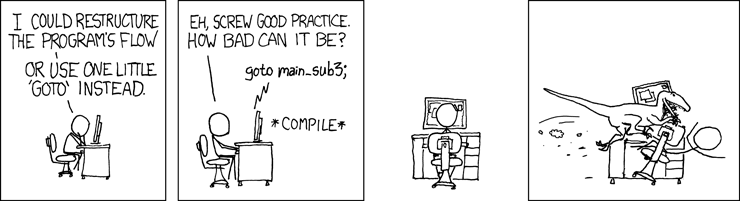
Programming is all about organization. This is not always obvious, and has some odd consequences. Let’s look at one: new features remove functionality from the user. And that’s a good thing.
Don’t believe me? Pick one. Let’s go with an old, simple one you should already know: goto vs. loops (for/while). (This is my favorite example, even though Python thankfully came along late enough to not even have goto in the first place, except as an April fools joke or a proof of concept library.)
You have total power with goto! Jump from anywhere, to anywhere! You can recreate all loops (for loops, for each loops, while loops, do while (C) loops) with it, and more (like functions)! So why are loops the newer, better feature?
goto (partially hypothetical in Python)
i = 0
label .start
print(f"Hi {i}")
i + 1
if i <= 10:
    goto .start
Compare to for loop:
for i in range(10):
    print(f"Hi {i}")
Hi 0
Hi 1
Hi 2
Hi 3
Hi 4
Hi 5
Hi 6
Hi 7
Hi 8
Hi 9
A programmer has to spend time to recognize what is happening in the first example - in the second example, even a fairly new Python programmer will immediately say “that prints 0 to 9”. The second example lets you build more complex programs, because you are working at a ‘higher level’, humans tend to do better with high level concepts (while computers work up from low level).
Also, we now need several features to make up for the loss of goto; the for loop, the while loop, and functions. Each is more restricted, with less functionality, but better readability and composability.
We will see lots of examples of this -- in section 2, especially.
Notebooks
We will be using notebooks today. Notebooks are fantastic for teaching, quick experimentation, for developing, or for driving a final analysis product. They are not for serious programming - that happens in .py files. Once you write something and get it working, move it to a .py file and add a test. Then import it into your notebook!
Python version
We will be using Python 3.12+, though everything should work for 3.10+ unless noted. SPEC 0 mandates that data science libraries currently support 3.12+ (support dropped 42 months after release), while general Python EOL is 3.10+ (5 year support window).
Key upcoming dates:
| Python | Release | SPEC 0 drop | General EOL |
|---|---|---|---|
| ~~Python 3.9~~ | ~~Oct 2020~~ | ~~Oct 2023~~ | ~~Oct 2025~~ |
| Python 3.10 | Oct 2021 | ~~Oct 2024~~ | Oct 2026 |
| Python 3.11 | Oct 2022 | ~~Oct 2025~~ | Oct 2027 |
| Python 3.12 | Oct 2023 | Oct 2026 | Oct 2028 |
| Python 3.13 | Oct 2024 | Oct 2027 | Oct 2029 |
| Python 3.14 | Oct 2025 | Oct 2028 | Oct 2030 |
| Python 3.X | Oct 2011+X | Oct 2014+X | Oct 2016+X |
Since Python 3.8, Python releases yearly, so you can expect a new Python release every October, along with EoL/SPEC 0 drops.
Extra: saving and running a file from Jupyter
For teaching purposes, we will be running some tools (pytest and mypy) from notebooks; this is not what they were designed to do, so we will use the following small extension to save a cell to a file and then run it with a Python module. I’m using a third-party library, rich, to render this with nice syntax highlighting in the notebook.
import rich
from rich.syntax import Syntax
from pathlib import Path

filepath = Path("save_and_run.py")
rich.print(Syntax(filepath.read_text(), "python", theme="default"))